
Product Designer Builder Portfolio: What to Show
A product designer builder portfolio should show interactive prototypes, how AI fits into the work, the thinking behind key choices, and a record of decisions. Screens alone don't show what a builder can actually do.
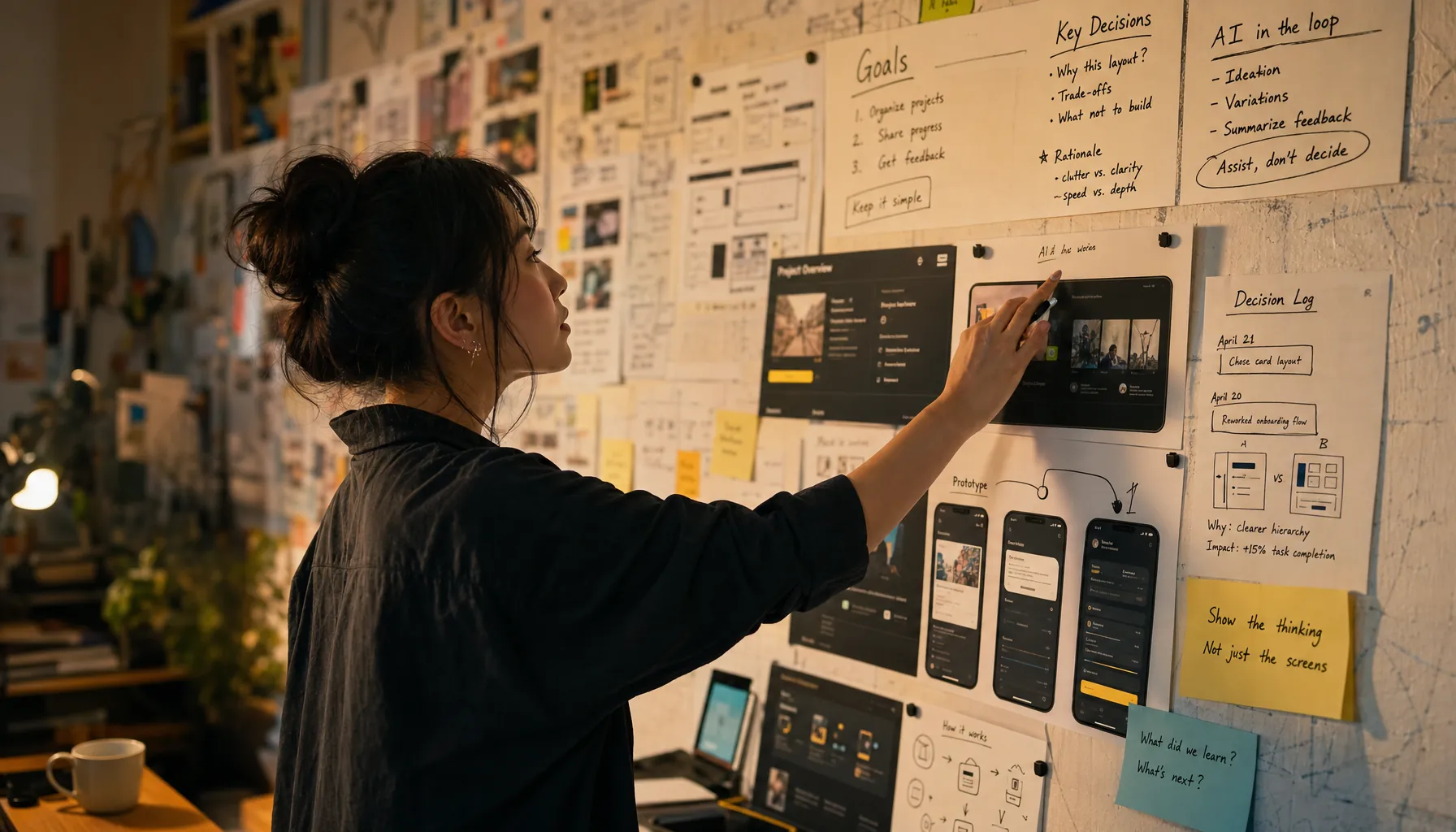
In 2026, a product designer builder portfolio needs to show how you got from a messy problem to a working interaction, not just the final Figma screen.
The search query product designer builder portfolio points to a pretty specific hiring problem: companies hiring builders need proof that a designer can think clearly, prototype fast, use AI without getting sloppy, and explain trade-offs when the constraints are real. This article treats a portfolio as shipped thinking. Not a gallery. A record of decisions, experiments, and working artifacts that make actual capability visible.
For the broader hiring model, see Get Hired as a Builder in 2026: Proof, Judgment, and Process.
Key Takeaways
- A strong product designer builder portfolio includes at least one interactive prototype, one decision record, one AI workflow explanation, and one measurable outcome or test result.
- Polished screens show taste. Builder evidence shows framing, sequencing, trade-offs, and execution.
- Companies hiring builders can assess product judgment much faster when the portfolio shows rejected paths, constraints, and why the final interaction won.
- AI use belongs in the workflow record: prompt intent, model output, human edits, validation, and final decision.
- The best design artifacts read like a case file, not a Dribbble gallery.
What should a product designer builder portfolio prove?
A product designer builder portfolio should prove that the designer can take a messy product problem and turn it into a usable interaction with clear reasoning behind it.
The best analogy here is a lab notebook. A gallery shows what made it to the wall. A lab notebook shows how the result happened, which assumptions fell apart, what got tested, and which decision changed the direction of the work. That matters because design hiring still leans too hard on brand names, polished portfolios, and interview smoothness. None of that reliably tells you whether someone can build with AI, test an interaction, or cut through ambiguity.
A builder portfolio for design has four core artifacts:
| Artifact | What it proves | Weak version | Strong version |
|---|---|---|---|
| Interactive prototype | Interaction thinking | Clickable mockup with no edge states | Prototype with task flow, empty states, error states, and handoff notes |
| AI workflow record | Tool judgment | List of AI tools used | Prompt intent, generated options, edits, checks, and discarded outputs |
| Design rationale | Product judgment | Paragraph about user empathy | Specific trade-off between speed, clarity, accessibility, scope, and risk |
| Decision record | Operating discipline | Final answer only | Date, context, options considered, decision, consequence, follow-up |
For a wider checklist of portfolio evidence across roles, use Proof of Work Portfolio for Builders in 2026: Examples and Checklist. This page stays on the design version: prototypes, rationale, and working proof.
Why do polished screens fail as hiring evidence?
Polished screens fail as hiring evidence because they hide the decisions that made the product usable.
A final frame can cover up the hardest parts of product design: the bad first assumption, the accessibility issue caught late, the empty state that changed onboarding, the copy rewrite that cut confusion, the engineering constraint that forced a smaller version. Companies hiring builders are not just judging taste. They are trying to answer a much more expensive question: can this person improve the product without needing constant translation?
According to Nielsen Norman Group’s explanation of prototyping, prototypes can vary in fidelity and are used to explore and evaluate design ideas before full implementation. The real signal is not fidelity on its own. It is whether the prototype tests the risk that actually matters. A high-fidelity onboarding flow that skips permissions, latency, and failed imports tells you less than a rough prototype that surfaces the hardest decision in the flow.
This is why AI Resume vs Proof of Work in 2026: Screening and Signals is part of the hiring conversation now. AI can generate cleaner application materials at scale. It cannot prove the judgment behind a product decision.
What evidence belongs in a product designer builder portfolio?
Evidence belongs in the portfolio when it helps a hiring manager reconstruct how the designer thought, built, tested, and revised.
A useful portfolio project needs a tight evidence stack. Start with the problem in one sentence. Name the user and the constraint. Show the prototype. Then show the decisions behind it. The work should not need a 20-minute voiceover to become understandable.
What should an interactive prototype show?
An interactive prototype should show the main task, the risky branch, and at least two non-happy-path states.
According to Figma’s guide to prototyping, prototypes connect frames and interactions so teams can demonstrate how a design behaves. In a builder portfolio, the interaction needs to earn its place. Show the moment where a user chooses, waits, fails, recovers, or changes direction. That is where product thinking shows up.
If the prototype includes an AI feature, skip the magic text box demo. Show the uncertainty. What happens when the model returns weak output? What does the user need to edit? Where does the system ask for confirmation? The related interview format is covered in AI Prototype Interview Demo in 2026: Steps and Script.
What accessibility and usability evidence should designers include?
Designers should include accessibility and usability evidence when those constraints changed the interaction.
According to Web Content Accessibility Guidelines 2.2 from the World Wide Web Consortium, accessibility requirements are organized around content being perceivable, operable, understandable, and robust. A portfolio does not need to restate the standard. It should show applied judgment: keyboard path, contrast check, focus order, error messaging, and screen-reader implications when they matter. For interactive components, W3C’s WAI-ARIA Authoring Practices Guide gives patterns for expected keyboard behavior and semantics.
The practical signal is simple. A designer who documents accessibility after the fact is showing compliance awareness. A designer who changes the flow because accessibility exposed a product problem is showing builder judgment.
How should designers show AI-assisted workflows without making AI the story?
Designers should show AI-assisted workflows by documenting where AI sped up exploration and where human judgment changed or rejected the output.
Weak AI evidence reads like a tool list. Strong AI evidence reads like an audit trail. A hiring manager does not need to know that a designer used ChatGPT, Claude, Midjourney, Perplexity, or a Figma plugin unless the tool materially changed the work. The real signal is whether the designer knew what to ask, what to ignore, and how to verify the result.
Use this structure:
- Intent: “Generate five onboarding variants for a first-time finance team user importing messy CSV data.”
- Output: “Model proposed a wizard, blank-state coach marks, and a template-first flow.”
- Human edit: “Rejected wizard because import errors appeared too late.”
- Validation: “Tested prototype with three internal users and found the template-first flow reduced setup confusion.”
- Decision: “Shipped import preview before mapping step.”
This is also where a design builder separates from someone listing AI tools like credentials. For the difference between credential signals and production signals, see Certifications vs Portfolio in 2026: Production and Hiring Signals. For the narrower problem of AI-written applications, see AI-Written Resume in 2026: How Builders Prove Work.
How should design rationale and decision records be documented?
Design rationale should document the trade-off, the alternatives, the reason for the decision, and the expected consequence.
The most common portfolio mistake is presenting a decision like it was obvious from the start. Real product work almost never feels that clean while you are in it. There are constraints: engineering capacity, brand rules, model latency, user trust, compliance review, mobile behavior, data quality, and time. A strong decision record makes those constraints visible.
Use a compact record format:
| Field | Example |
|---|---|
| Decision | Move AI-generated summary behind a review step |
| Context | Users relied on summary for client-facing notes |
| Options rejected | Auto-publish summary, hide summary, require full manual rewrite |
| Reason | Review step preserved speed while reducing trust risk |
| Evidence | Prototype test showed users edited 4 of 5 generated summaries |
| Follow-up | Add confidence cue and source preview in next version |
That record is hiring evidence. It shows taste, risk handling, and product sense on one page. The same reasoning shows up in Judgment Calls in AI Work in 2026: Trade-Offs and Answers and in Builder Interview Trade-Offs in 2026: Answers and Examples.
How do you build a product designer builder portfolio step by step?
Build the portfolio by choosing one real problem, producing a working prototype, and attaching the decision evidence that explains how the work changed.
- Choose one product problem with a clear user, constraint, and failure mode.
- Write a one-sentence problem statement that names the user action and the obstacle.
- Build an interactive prototype that includes the main path, an error path, and a recovery path.
- Record the AI-assisted workflow, including prompt intent, useful output, rejected output, edits, and validation.
- Create a decision record for the highest-stakes design choice in the project.
- Add accessibility and usability notes tied to specific screens or interactions.
- Publish the artifact with a short README that explains context, tools, files, and how to view the prototype.
- Prepare a five-minute demo that shows the problem, prototype, decision, and trade-off.
According to GitHub’s documentation on repository READMEs, a README can explain what a project does and why it is useful. Designers should steal that habit. A portfolio project needs an entry point. The reviewer should know what to open, what to test, and which decision to inspect.
For demo structure, use Builder Interview Demo in 2026: Steps and Script. For project selection, AI Project Ideas for Builders in 2026: Hiring Examples gives examples that can be adapted into design-first artifacts.
How should designers present the portfolio in interviews?
Designers should present the portfolio by walking through the decision trail, not by narrating every screen.
The strongest sequence is simple: problem, constraint, prototype, failed option, decision, result. Keep the screens in service of the reasoning. Companies hiring builders are listening for how the designer scopes the problem, what they notice, how they handle uncertainty, and whether they can work with engineering and product without hiding behind polish.
The hiring side is described in Hiring Managers Look for in Builders in 2026: Signals and Requirements. The same pattern shows up across roles. A product manager builder portfolio shows prioritization evidence, as covered in Product Manager Builder Portfolio in 2026: Project Checklist. Engineering-heavy roles need code, system constraints, and agentic workflows, which is why Agentic Engineer Hiring in 2026: CPTO Signals and Requirements and Agentic Engineer: Definition, Skills, and Hiring Signals use a different evidence bar.
For designers, the strongest portfolio does not try to cosplay as an engineering repo or a PM strategy memo. It shows cross-role fluency without dropping the design craft. That distinction matters on teams where roles blur, a topic covered in Builder Roles vs Job Titles in 2026: Product and Engineering Teams.
Frequently Asked Questions
What is a product designer builder portfolio?
A product designer builder portfolio is a design portfolio that shows working proof: interactive prototypes, AI-assisted workflow records, design rationale, decision records, and usability constraints. It proves how the designer thinks and builds, not just how the final interface looks.
How many projects should a product designer builder portfolio include?
Two strong projects are usually more useful than six thin ones. Each project should show a specific product problem, a prototype, a trade-off, and evidence of revision. One deep project can work if it includes enough decision evidence.
Should designers disclose AI use in their portfolio?
Yes. Designers should disclose AI use when it materially shaped research synthesis, concept generation, copy, visual exploration, prototyping, or evaluation. The useful version of that disclosure explains what the tool produced, what the designer changed, and how the final decision was validated.
Do product designers need code in a builder portfolio?
Code helps when it clarifies feasibility, behavior, or integration, but it is not required for every product designer. A designer can show builder capability through prototypes, structured decision records, usability evidence, accessibility checks, and clear handoff artifacts.
What should a hiring manager look for first in a design builder portfolio?
A hiring manager should look first for the decision trail: what problem was chosen, what constraint mattered, which options were rejected, and how the prototype changed once evidence came in. That trail is much harder to fake than polished screenshots.