
How to Explain Judgment Calls in AI Work | Provn
Companies hiring builders look at the thinking behind AI-assisted work: what builders chose, skipped, prioritized, and revised before the final output took shape.
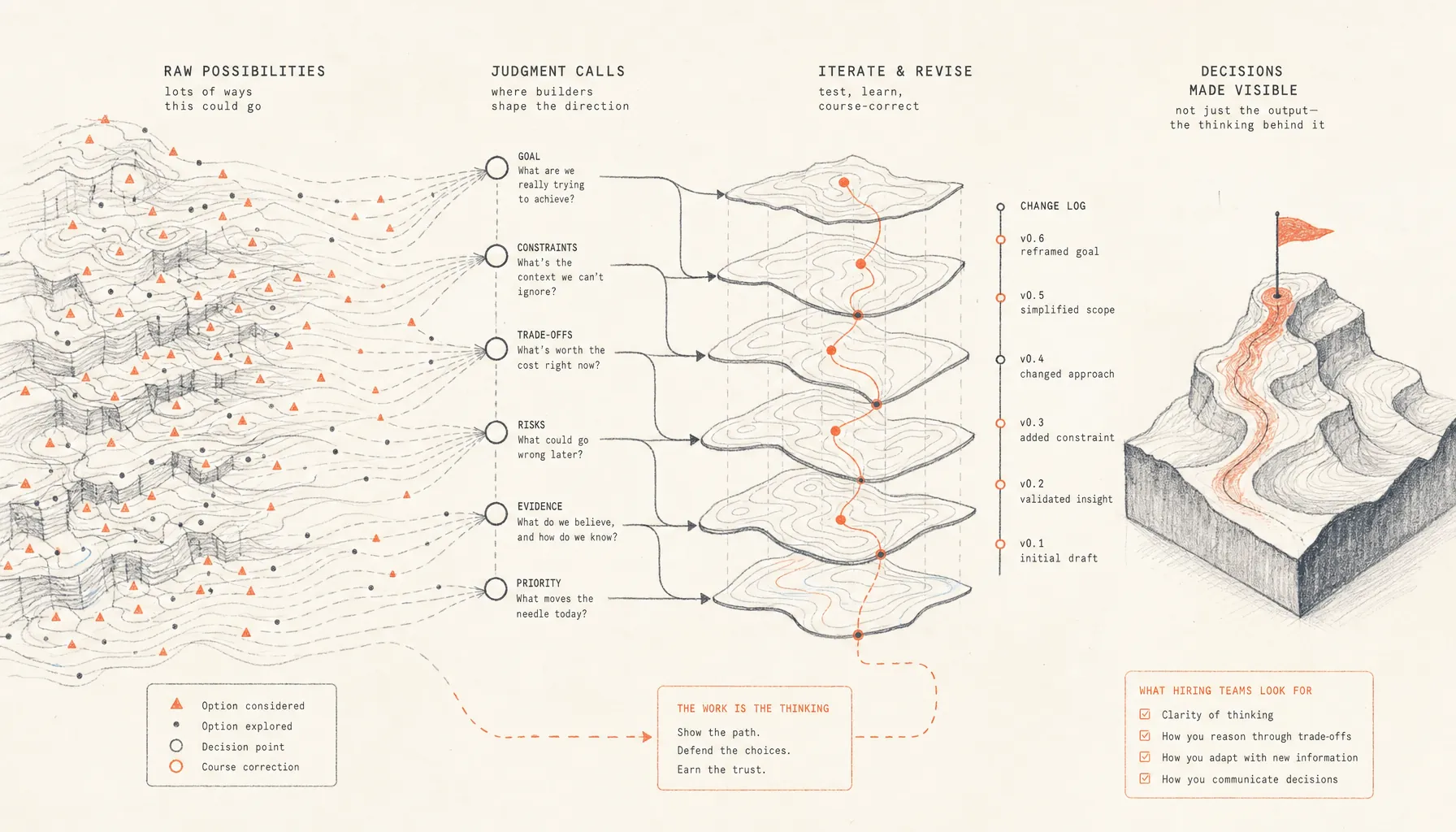
How to Explain Judgment Calls in AI Work
Stack Overflow’s 2024 Developer Survey on AI tools found that 76% of respondents were already using AI tools or planning to. At that point, output alone stops being a useful filter. Plenty of people can get something polished on screen. The difference now is judgment.
That is why learning how to explain judgment calls in AI work matters in 2026. Companies hiring builders are looking at the reasoning trail: what you chose, what you threw out, what you optimized for, and what you changed when the model gave you something that looked right but was not actually good enough.
Featured answer: To explain judgment calls in AI work, walk through the goal, the constraints, the options you weighed, the AI outputs you rejected, the tradeoffs you accepted, and the changes you made after testing. The best explanations make it clear why the final artifact looks the way it does, not just which tool touched it.
Key Takeaways
- AI-assisted work needs a reasoning trail. The artifact shows output quality. The walkthrough shows judgment.
- The four judgment calls companies hiring builders want to hear are what you chose, rejected, prioritized, and changed.
- A strong explanation includes constraints, failed paths, model errors, evidence, and why the final decision held up.
- Builders should document judgment while building with a short decision ledger, instead of trying to reconstruct it from memory before an interview.
- Provn’s proof-over-polish model favors demonstrated work because AI-generated resumes flatten too many people into the same polished blur.
How do you explain judgment calls in AI work?
You explain judgment calls in AI work by making the decision trail visible: the goal, the constraints, the alternatives, the rejected outputs, the priorities, and the revisions.
The common mistake is treating an AI-assisted project like a magic trick. You show the final screen, the generated analysis, the shipped prototype, or the polished deck. Then you name the tools. That is weak evidence. It proves tool access. It does not prove judgment.
A better explanation reads like a build log. It tells a company hiring builders what the model could not decide for you. For example: the model suggested a broad onboarding flow, but you narrowed it to first-session activation because the user needed one successful action in under two minutes. The model generated five copy variants, but you cut three because they promised product behavior that did not exist. The model proposed a database structure, but you changed it after realizing auditability mattered more than speed in this case.
The real question underneath all of this is simple: did the builder steer the work, or did the model steer the builder?
That is also the difference between proof and polish. Polished AI output can hide the most useful evidence. Companies hiring builders want to know where the work got messy. The dead ends, constraint calls, and corrections are the signal. For the bigger hiring picture, see Get Hired as a Builder in 2026: Proof, Judgment, and Process.
What are hiring leaders actually evaluating when they ask about AI decisions?
They are trying to figure out whether you can use AI to move faster while still owning the problem, the evidence, and the consequences of the final decision.
Most AI-assisted work has a presentation problem now. The first version looks finished much earlier than it used to. The screen is clean. The copy mostly makes sense. The prototype moves. The analysis has a shape. That creates a false signal. Work that looks complete can still be strategically flimsy.
According to the National Institute of Standards and Technology AI Risk Management Framework, responsible AI work includes mapping context, measuring risks, and managing outcomes. That language comes from governance, but the hiring takeaway is more practical than that: context and evaluation matter more than generation.
In an interview, that usually comes down to five questions:
- Can you define the problem tightly enough for AI to be useful?
- Can you spot when the model’s answer sounds plausible but is wrong?
- Can you choose between speed, quality, scope, and risk?
- Can you change course when evidence blows up the first plan?
- Can you explain the work without hiding behind tool names?
Companies hiring builders are dealing with a lot of noise because AI made surface polish cheap. A resume bullet that says “built an AI-powered dashboard” tells them almost nothing. A two-minute explanation of why you rejected the model’s first metric hierarchy tells them a lot. For the hiring-side version of this, read Hiring Managers Look for in Builders in 2026: Signals and Requirements.
Which four judgment calls should every AI work walkthrough cover?
Every AI work walkthrough should cover four judgment calls: what you chose, what you rejected, what you prioritized, and what you changed.
Think of those as the four corners of the story. Leave one out and the explanation usually collapses into tool narration. “I used Claude for research, ChatGPT for copy, Cursor for code, and Figma for the prototype” is not a judgment story. It is a shopping list.
What did you choose?
What you chose explains the initial direction, the model setup, the user or business constraint, and why one path deserved the first serious pass.
Strong builders do not say, “I asked AI for ideas.” They say, “I gave the model a constrained brief: reduce first-week churn for a solo founder using a finance tool, with no new engineering work beyond email and dashboard copy.” That tells a company hiring builders that the builder shaped the problem before generating solutions.
Useful choices to explain include:
- The user segment you focused on.
- The success metric you optimized for.
- The workflow, screen, feature, or system boundary you picked.
- The model or tool you used and why it fit the task.
- The evidence you treated as reliable.
According to Anthropic’s prompt engineering documentation, clear and direct instructions improve model performance. In hiring terms, a vague prompt is also a vague judgment signal. The prompt itself can show whether the builder understood the work.
What did you reject?
What you rejected shows taste, discipline, and the ability to spot work that is fluent but wrong for the situation.
This is the part many builders skip because rejected work feels like waste. In an interview, it is not waste at all. It is evidence. Companies hiring builders learn more from a rejected path than from a perfect screenshot because rejection shows standards.
Examples:
- You rejected a model-generated pricing page because it leaned on tired SaaS language instead of addressing buyer risk.
- You rejected a code suggestion because it solved the happy path and ignored permissions.
- You rejected a user research summary because the model generalized too much from three quotes.
- You rejected a dashboard layout because it made the vanity metric more visible than the operating metric.
The wording matters. Do not say, “The AI gave me bad output.” Say, “The first output failed because it optimized for readability instead of decision use. I needed the head of support to decide which queue to staff first, so I rebuilt the output around queue volume, severity, and response time.”
What did you prioritize?
What you prioritized shows how you handled constraints, which is where real work usually lives.
Every project has a stack of constraints. Time. Data quality. User risk. Maintainability. Speed. Cost. Clarity. Scope. AI does not remove that stack. It just makes the first draft cheaper, which can tempt builders to sprawl instead of making sharper calls.
A strong explanation names the order clearly. For example: “I prioritized activation over personalization because the first session had a higher failure risk than long-term engagement. I kept personalization for later.” That one sentence shows product sense. It also shows the builder did not confuse a flashier feature with the right next move.
Use this sentence pattern when explaining priorities:
“I prioritized [constraint or outcome] over [competing option] because [evidence or risk], so I [specific decision].”
That works across product, design, engineering, research, operations, and growth work. It forces the tradeoff into the open without turning the answer into a TED Talk.
What did you change?
What you changed shows whether you learned during the build or just defended the first version out of habit.
The strongest builders can point to a moment when the work changed because the evidence changed. Maybe a user misunderstood the prototype. Maybe the model hallucinated a market fact. Maybe the code worked in isolation and failed against real data. Maybe the first demo impressed peers but confused the buyer.
A company hiring builders does not need every revision. They need the one that proves you were paying attention. Use a before-and-after structure:
- Before: “The workflow asked users to categorize transactions manually.”
- Trigger: “Testing showed users did not understand why categorization came before seeing savings.”
- After: “I moved savings preview earlier and delayed categorization until the user had a reason to complete it.”
- Why it mattered: “The new order made the value visible before asking for effort.”
This is where AI-assisted work starts to look like actual work. The builder is no longer describing generation. The builder is describing correction.
How do you document AI judgment while building, not after?
You document AI judgment while building by keeping a short decision ledger that captures prompts, rejected outputs, constraints, tests, and revisions when they happen.
Memory is a terrible archive. Builders often wait until the interview to reconstruct what happened, and that is usually when the best parts get sanded off. The work starts sounding too clean. The false starts disappear. The judgment calls turn into a generic success story, which is exactly what everyone else is saying too.
Use a simple ledger. It does not need to be pretty. It just needs to be honest.
- Record the task in one sentence before using AI.
- Write the constraint that matters most for this version.
- Save the prompt or instruction that shaped the model output.
- Capture one output you rejected and write down why.
- Document one priority call between two competing options.
- Test the output against a user, dataset, requirement, or edge case.
- Revise the work based on what the test showed.
- Summarize the final decision in one sentence a company hiring builders can understand.
| Ledger field | What to write | Why hiring leaders care |
|---|---|---|
| Task | “Build a first-session onboarding flow for a budgeting app.” | Shows whether the problem was scoped. |
| Main constraint | “User must see value before connecting a bank account.” | Shows prioritization under friction. |
| AI instruction | “Generate three onboarding flows that avoid financial jargon.” | Shows how the builder directed the model. |
| Rejected output | “Rejected flow two because it asked for too much data before value.” | Shows standards and judgment. |
| Revision | “Moved savings preview to step one after testing confusion.” | Shows learning during the build. |
According to ISO/IEC 42001 on artificial intelligence management systems, organizations need processes for responsible AI use, including controls around how AI systems are managed. A personal decision ledger is the builder-level version of that discipline. It makes the work auditable without turning the project into paperwork theater.
If the project belongs in a public portfolio, the ledger should sit behind the artifact. The artifact gets attention. The ledger earns trust. For portfolio structure, use Proof of Work Portfolio for Builders in 2026: Examples and Checklist.
What does a strong AI work explanation sound like in practice?
A strong AI work explanation sounds specific, constrained, and grounded in evidence, with a clear line between what the model produced and what the builder decided.
Weak explanations name tools over and over. Strong explanations name decisions. You can hear the difference immediately.
| Scenario | Thin explanation | Strong explanation |
|---|---|---|
| Product | “I used AI to brainstorm feature ideas and built the best one.” | “I asked for ten retention ideas, rejected the ones that needed new data pipelines, and picked the reminder flow because it could ship with existing event data.” |
| Design | “I used AI to make the onboarding cleaner.” | “The first AI draft reduced copy but also removed the user’s reason to continue. I restored the value statement and cut only the steps that created duplicate effort.” |
| Engineering | “Cursor helped me build the API.” | “The generated route handled the happy path, but it did not enforce account-level access. I added authorization checks before I worried about response time.” |
| Research | “I summarized user interviews with AI.” | “The model grouped complaints by wording, so I regrouped them by failure point in the workflow. That changed the recommendation from copy edits to sequence changes.” |
The strong versions all do the same thing. They show the builder standing between the model and the final decision.
Here is a practical three-part script:
- Context: “The goal was to [specific outcome] under [constraint].”
- Judgment: “AI suggested [option], but I rejected or changed it because [reason].”
- Result: “The final version [specific change], which mattered because [decision, user, or business impact].”
Example: “The goal was to reduce setup friction for a small-business invoicing tool without adding engineering scope. AI suggested a personalized setup wizard, but I rejected it because it required data the product did not already collect. I built a two-step default template flow instead, which got users to their first invoice faster without creating a new data dependency.”
That answer is short, but it carries weight. It also avoids a trap a lot of people fall into: treating AI use as the accomplishment. AI was part of the workflow. The builder still made the call.
How should builders handle mistakes, hallucinations, and changed direction?
Builders should handle AI mistakes by naming the failure mode, explaining how they caught it, and showing the specific correction that changed the work.
Do not hide the mistake. A spotless story with no wrong turns is less believable in AI-assisted work because models produce confident errors, stale references, shallow defaults, and fake structure all the time. Catching those issues is part of the skill.
According to NIST’s Generative AI Profile, generative AI risks include confabulation, information integrity failures, and harmful or inaccurate outputs. Put more simply: quality control is part of the job.
Use this format when discussing a model error:
- Failure mode: “The model invented a compliance requirement that did not exist.”
- Detection: “I checked the source against the official agency page and found no matching rule.”
- Correction: “I removed the claim and changed the recommendation from compliance-driven to risk-driven.”
- Prevention: “On the next pass, I required citations and verified each source before using it.”
The same logic applies to code. A model can generate a convincing implementation that falls apart under real permissions, edge-case data, latency, or error handling. A builder who says, “I tested the generated function against null input, duplicate records, and unauthorized access” gives much stronger evidence than a builder who says, “The code worked.”
Changed direction deserves plain language too. Say what changed and why. “I originally designed for admins, then switched to frontline users after realizing admins only reviewed exceptions once a week.” That is a judgment call. It tells the company hiring builders that the builder did not get emotionally attached to the first frame.
Where should judgment evidence live in a portfolio or interview?
Judgment evidence should live beside the work artifact: in the portfolio write-up, the demo script, the interview walkthrough, and the source notes that support the final decision.
The artifact is the front door. The reasoning is the room behind it. Companies hiring builders need both. A prototype without reasoning can be copied. A resume bullet can be generated in seconds. A polished case study can be overedited into mush. A decision trail is harder to fake because it carries sequence, constraint, correction, and ownership.
Place judgment evidence in four places:
- Project summary: one sentence on the problem and the constraint.
- Process section: three to five decisions, including at least one rejected path.
- Demo narration: the reason each major screen, workflow, model output, or technical choice exists.
- Appendix or notes: prompt excerpts, test results, source checks, before-and-after revisions.
This is where Provn’s proof-over-polish frame matters. AI-generated resumes compress builders into the same language. Proof of work opens the picture back up. It shows the work, the decision path, and the builder’s standards. For the resume screening problem, see AI Resume vs Proof of Work in 2026: Screening and Signals.
The strongest presentation is not longer. It is easier to inspect. A company hiring builders should be able to stop at any point and ask, “Why did you do that?” The builder should have an answer that points to a constraint, a test, a rejected option, or a changed assumption.
Provn is where builders get hired. Performance over pedigree. Proof over polish. In AI work, proof includes the output and the judgment behind it.
Frequently Asked Questions
These are the practical questions builders run into when they need to explain AI-assisted decisions in interviews and portfolio reviews.
What is the best way to explain judgment calls in AI work?
The best way is to describe the decision sequence: the goal, the constraint, the AI output, the rejected alternatives, the priority call, and the revision. A strong answer makes it obvious which parts came from the model and which decisions came from the builder.
Should builders show prompts in an interview?
Builders should show prompts when the prompt reveals problem framing, constraints, or evaluation criteria. Raw prompts are less useful when they only prove tool usage. A short prompt excerpt paired with the reason it was written usually gives better evidence than a long prompt transcript.
How much AI process should go into a portfolio?
A portfolio should include enough AI process to make the work inspectable: one problem statement, two or three major decisions, one rejected path, one revision, and the final result. Do not dump every prompt. Show how judgment shaped the artifact.
How do hiring leaders tell the difference between AI polish and builder judgment?
They look for evidence that the builder owned the decision path. AI polish gives you fluent output. Builder judgment gives you constraints, tradeoffs, rejected options, tests, corrections, and a clear reason the final version was chosen.
What should builders say when AI made a mistake in their work?
Builders should name the mistake, explain how they caught it, and describe the correction. For example: “The model invented a source, so I checked the official page, removed the claim, and changed the recommendation.” That shows verification instead of blind trust.