
How to Demo Something You Built in an Interview
A builder interview demo should show how you size up problems, make decisions, and learn fast. This guide gives builders a clear structure for walking through a prototype without turning the interview into a feature tour.
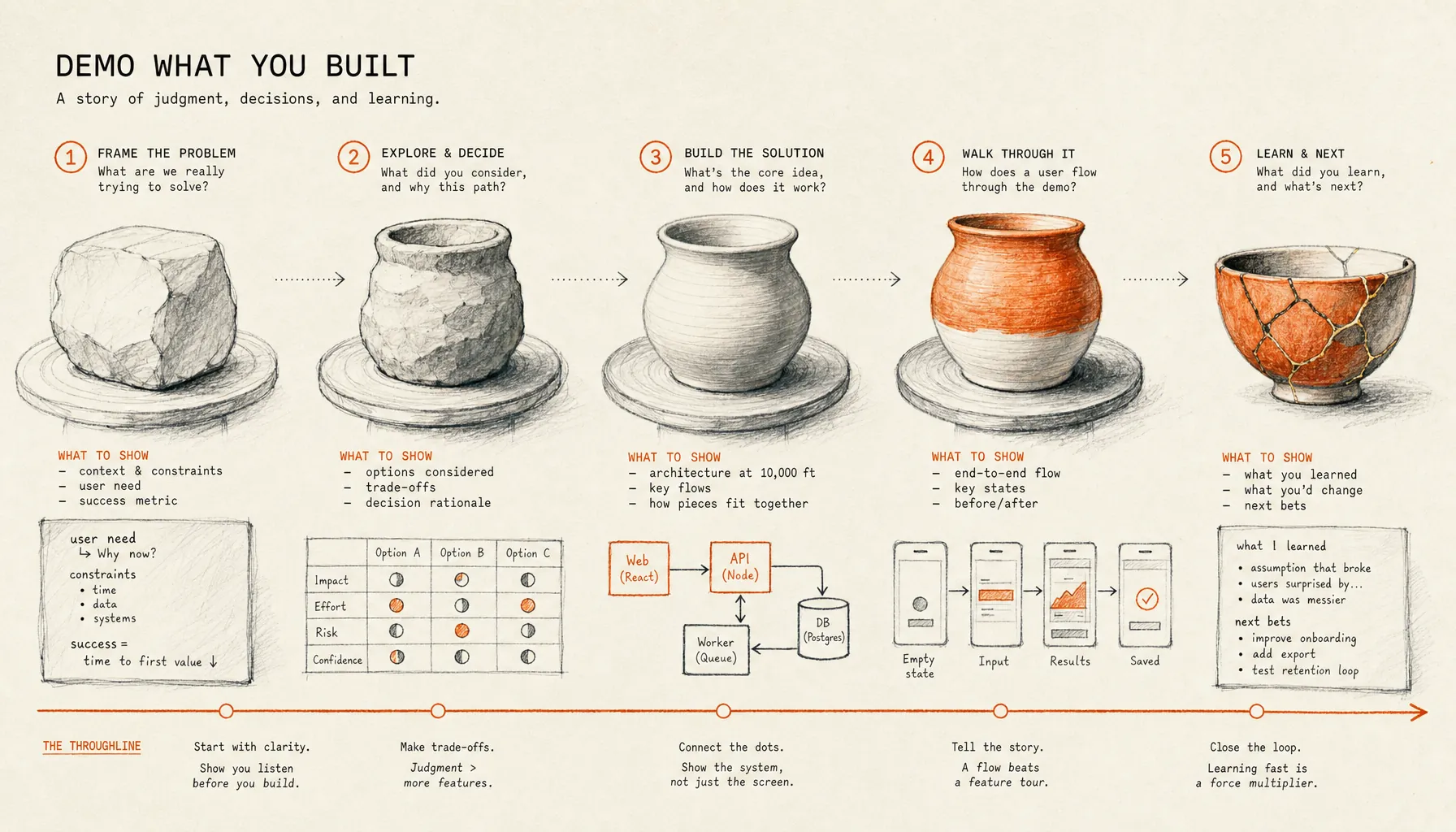
How to Demo Something You Built in an Interview
A strong builder demo usually wins or loses in the first three minutes, before the prototype does anything impressive. The interviewer is trying to see whether you understood the problem, made sane trade-offs, used AI or tools with judgment, and can explain your work under pressure.
This guide explains how to demo something you built in an interview without turning the session into a tour of buttons, screens, and features. The structure is built for builders who need to prove the work, not decorate the story around it.
Key Takeaways
- A builder demo should start with the problem, the user, the constraint, and the success measure before showing the prototype.
- The strongest interview structure is a 10 to 12 minute walkthrough: context, problem, decision chain, prototype path, evidence, and next iteration.
- Feature tours fail because they show output without showing judgment. Interviewers need to understand why each choice exists.
- Prepare three artifacts before the interview: a one-line problem statement, a decision log, and a recovery plan for bugs or broken flows.
- Follow-up questions are part of the demo. Treat them as a live test of reasoning, not an interruption.
Why does a prototype demo fail when it becomes a feature tour?
A prototype demo fails when the builder shows what exists before proving why it should exist. A feature tour gives the interviewer surface area, while a builder demo gives the interviewer evidence.
The trap is understandable. You built the thing. You remember the late fixes, the confusing edge cases, the prompt that finally worked, the screen you redesigned six times. Under interview pressure, the easiest move is to click through the artifact and narrate what the interviewer can already see.
That is the wrong signal. A hiring manager is not only checking whether the prototype runs. They are checking whether you can reduce ambiguity, make decisions with incomplete information, and explain the relationship between problem, constraint, and implementation. That is why structured interviews matter. According to Google’s structured interviewing guidance, using consistent questions and evaluation criteria helps interviewers compare evidence rather than impressions.
The feature tour breaks that comparison. One builder shows a polished dashboard. Another shows a rough prototype with sharper problem framing. If both spend the whole time clicking through screens, the interviewer defaults back to taste, pedigree, and polish. The demo becomes another resume, only with a UI.
The better frame is evidence chain. Every part of the demo should answer one of six questions:
- What problem did you choose?
- Who had the problem?
- What constraint shaped the solution?
- What decision did you make?
- What did the prototype prove?
- What would you change next?
That frame keeps the demo from becoming performance theater. It also mirrors how companies evaluate builders in 2026: less emphasis on claims, more emphasis on demonstrated process. For the broader hiring model, see how to get hired as a builder in 2026.
How should you demo something you built in an interview?
The best way to demo something you built in an interview is to present the problem first, then walk through the decisions that shaped the prototype, then show one realistic user path, then explain what you learned. A 10 to 12 minute structure works because it leaves time for follow-up questions without rushing the evidence.
Use the demo like a courtroom exhibit. The artifact matters, but the case depends on how the evidence is introduced. If you start with the screen, the interviewer has to infer the purpose. If you start with the problem and constraint, every screen has a reason to exist.
Here is the repeatable structure.
What are the builder interview demo steps?
A builder interview demo should follow a fixed sequence: frame the problem, state the constraint, explain the key decisions, show the prototype path, present evidence, and invite the hardest question. This sequence gives the interviewer a clean way to evaluate judgment instead of counting features.
- State the user, problem, and desired outcome in one sentence.
- Name the constraint that made the build difficult, such as time, data quality, latency, cost, accessibility, or scope.
- Explain the two or three decisions that shaped the prototype before opening the artifact.
- Show one realistic user path from start to finish without detouring into every feature.
- Point to evidence that the prototype worked, failed, or taught you something specific.
- Identify one trade-off you would revisit if you had another week.
- Ask for follow-up questions on the riskiest part of the build.
Do not memorize a monologue. Memorize the order. The order matters because interviews are noisy. Screenshare fails. The interviewer interrupts. A login expires. A model response takes too long. If the structure is stable, the demo can survive normal friction.
| Demo segment | Time target | What the interviewer learns | Common mistake |
|---|---|---|---|
| Problem frame | 60 to 90 seconds | Whether you chose a real problem and defined success | Starting with “I built an app that...” |
| Constraint | 30 to 60 seconds | Whether you understood the hard part | Listing tools instead of constraints |
| Decision chain | 2 to 3 minutes | Whether your choices were intentional | Explaining every implementation detail |
| Prototype path | 4 to 5 minutes | Whether the solution works in a realistic flow | Clicking through every screen |
| Evidence and next step | 2 minutes | Whether you can learn from the build | Claiming success without proof |
This format also keeps you from overfitting to polish. A rough prototype can beat a beautiful one if the rough prototype shows better judgment. A beautiful prototype loses ground when the builder cannot explain why the problem mattered, why the scope was chosen, or what changed after testing.
How do you explain the problem before showing the prototype?
Explain the problem by naming the user, the painful moment, the existing workaround, and the measurable outcome your prototype tried to improve. The interviewer should understand the build before seeing a single screen.
The problem statement should be short enough to survive interruption. Use this format:
“For [user], when [situation], the current workaround is [behavior], which causes [cost]. I built [prototype] to improve [outcome].”
Example:
“For small recruiting teams, when 300 similar inbound profiles arrive for one builder role, the current workaround is keyword filtering, which hides strong work behind weak formatting. I built a screening prototype to rank evidence from project artifacts and short walkthroughs.”
That statement does four useful things. It avoids tool worship. It gives the interviewer a user. It states the broken workflow. It defines the prototype as a response to a cost, not a random object.
Keep the problem narrow. “I wanted to improve hiring” is too broad. “I wanted to help a three-person recruiting team compare builder project evidence across 50 submissions in under 30 minutes” is narrow enough to test. Specificity makes the demo easier to judge.
Good problem framing also protects you from a common interview failure: the impressive artifact with no business reason. A calendar assistant, expense parser, portfolio scanner, AI tutor, or internal dashboard can all look competent in isolation. The real question is whether the prototype makes a painful workflow faster, clearer, cheaper, safer, or more accurate.
If your prototype came from portfolio work, connect it to the evidence you already maintain. A demo is stronger when the artifact, write-up, README, and decision log agree with each other. Builders preparing that evidence should use a separate portfolio checklist rather than trying to cram every artifact into the live interview. See proof of work portfolio for builders for that prep layer.
What is a good problem statement for a prototype demo?
A good problem statement describes a specific user behavior that exists before your prototype and a specific outcome the prototype tries to change. It should avoid broad nouns like productivity, engagement, workflow, or efficiency unless those words are tied to a measurable action.
Weak version: “I built a tool to make onboarding better.”
Strong version: “New support reps were taking 12 to 15 minutes to find the right refund policy during mock tickets, so I built a searchable policy assistant that returns the policy section, confidence level, and escalation rule in one view.”
The strong version gives the interviewer something to test. They can ask where the 12 to 15 minutes came from. They can ask how confidence was calculated. They can ask what happens when the assistant is wrong. Those questions are good. They move the interview into judgment.
How do you walk through decisions without sounding rehearsed?
Walk through decisions by explaining the options you rejected, the constraint that forced the choice, and the consequence of the choice. A decision without an alternative sounds like a preference; a decision with a rejected option sounds like judgment.
Most builders under-explain decisions. They say, “I used Next.js, Supabase, and OpenAI,” then move on. That tells the interviewer what stack appeared in the project. It does not explain why the stack was appropriate.
Use the decision triangle:
- Option: What paths were available?
- Constraint: What made one path better for this prototype?
- Cost: What did your choice sacrifice?
Example:
“I kept the first version as a browser prototype instead of building a native app because the risky assumption was the review flow, not device integration. That let me test the core loop faster, but it means offline behavior and push notifications are unresolved.”
This answer works because it does not pretend the choice was free. Strong builders can name the bill that came due. That is one of the clearest interview signals because real work is mostly trade-offs under constraints.
When AI was part of the build, say exactly where it entered the process. Do not give a vague statement like “I used AI to help.” Separate ideation, code generation, test data, interface copy, evaluation, and debugging. Each use has a different risk profile. If a model wrote code, explain how you reviewed it. If a model generated test data, explain why that data was sufficient or insufficient. If a model helped design flows, explain what human judgment changed.
For builders who need a narrower script on trade-offs, the related guide how to explain judgment calls in AI work covers how to explain AI-assisted decisions without making the tool the main character.
What decisions should you mention in a builder demo?
Mention decisions that changed the shape, risk, or usefulness of the prototype. Do not spend interview time on choices that had no meaningful alternative.
The highest-signal decisions usually fall into five categories:
- Scope: what you refused to build in version one.
- Data: what inputs you trusted, ignored, cleaned, or simulated.
- User flow: what step you moved, removed, or made explicit.
- Quality control: how you checked for errors, hallucinations, broken states, or misuse.
- Delivery: why the prototype is a script, Figma flow, web app, CLI, agent, dashboard, or internal tool.
There is no need to mention every library, plugin, or prompt. Tool details matter when they affected the outcome. Otherwise, they become trivia.
How should you handle bugs, gaps, and unfinished work?
Handle bugs and unfinished work by naming the issue before the interviewer discovers it, explaining why it exists, and showing how you would isolate or fix it. A controlled admission is stronger than a surprised apology.
Prototype demos break for ordinary reasons. The API key expires. A test account has the wrong permissions. A local server fails. A model response changes. A browser extension interferes. None of this automatically hurts you. What hurts is acting as if the prototype was finished software when the evidence says otherwise.
Prepare a recovery plan with three layers:
- Live path: the normal demo flow.
- Fallback path: screenshots, short video, seed data, or a local recording of the same flow.
- Explanation path: a short account of the failure mode and how you would debug it.
According to GitHub’s documentation on repository READMEs, a README often explains what a project does, why it is useful, and how users can get started. That same principle applies to a demo backup. If the live artifact fails, your supporting materials should still make the project understandable.
The strongest recovery line is plain:
“This part is still brittle. The classifier handles clear examples well, but ambiguous inputs need a human review state. I would not ship this without an escalation path and a logged confidence threshold.”
That answer turns a gap into evidence. It shows you know the difference between a prototype, a pilot, and production software.
| Issue during demo | Weak response | Strong response |
|---|---|---|
| Bug appears in the main flow | “It worked earlier.” | “This is the failure state. I’ll show the fallback, then explain what I would inspect first.” |
| Feature is unfinished | “I ran out of time.” | “I cut this because the main risk was the intake flow, not reporting.” |
| AI output is wrong | “The model messed up.” | “This is why I added human review for low-confidence outputs.” |
| Interviewer asks about scale | “It should scale.” | “I have not tested scale. The first bottleneck is likely retrieval latency, then logging cost.” |
Accessibility is another common gap. If your prototype has a visual interface, be ready to explain what you did or did not check. The W3C Web Content Accessibility Guidelines 2.2 define testable criteria for perceivable, operable, understandable, and stable web content. You do not need to claim full compliance for a prototype unless you tested it. You do need to know whether keyboard navigation, color contrast, labels, and error states were considered.
How do you answer follow-up questions after the demo?
Answer follow-up questions by identifying what kind of question is being asked: evidence, trade-off, failure mode, user, technical depth, or next step. The answer should match the category instead of drifting into another feature explanation.
Follow-up questions are where many demos become real interviews. The polished script is over. The interviewer starts probing. This is where a builder shows whether the work was understood or merely assembled.
Use this classification table in real time:
| Question type | What they are testing | Answer structure |
|---|---|---|
| “How do you know this problem matters?” | Problem evidence | User behavior, existing workaround, cost, source of evidence |
| “Why did you build it this way?” | Decision quality | Options, constraint, trade-off, consequence |
| “What breaks first?” | Operational judgment | Likely failure, detection method, mitigation |
| “What would you do with another week?” | Prioritization | Highest-risk assumption, next test, expected learning |
| “How did AI contribute?” | Authorship and review | Task split, verification steps, human decisions |
The mistake is answering every follow-up as if it asks, “What else does the product do?” Most follow-ups are not feature requests. They are attempts to locate your judgment. If the interviewer asks what breaks first, do not show another screen. Name the brittle point.
Usability evidence deserves the same discipline. According to Nielsen Norman Group’s usability testing model, testing with five users can reveal about 85 percent of usability problems when the probability of detecting a problem with one user is 31 percent. That does not mean every prototype needs five formal tests before an interview. It means a builder should understand that one friendly reaction is not the same thing as evidence.
When you do not know, say what you would test. A strong answer is not always a complete answer. It is a bounded answer.
Weak: “I think users would like it.”
Strong: “I have not tested that segment yet. I would run five task-based sessions with users who already do this workflow manually, then measure completion time, confusion points, and whether they trust the recommendation.”
Companies hiring builders are listening for that discipline. The related cluster article what hiring managers look for in builders 2026 covers the evaluation side in more detail.
What should you prepare before the interview?
Prepare the demo as a small evidence packet: a live artifact, a one-page decision log, a fallback recording, and three prepared answers to likely objections. The goal is to make the work inspectable even if the live demo is interrupted.
The prep should take less time than the build, but it should not be improvised. A prototype without explanation forces the interviewer to grade polish. A prototype with clean artifacts lets the interviewer inspect process.
What should be in your demo packet?
Your demo packet should include only the materials needed to understand, run, and evaluate the prototype. Anything that does not support those goals belongs outside the interview.
- One-line problem statement: the user, painful moment, workaround, cost, and intended outcome.
- Prototype link or local setup: tested on the machine and browser you will use during the interview.
- Fallback recording: a 60 to 120 second clip of the main path working.
- Decision log: three to five decisions with rejected alternatives and trade-offs.
- Evidence note: test results, user reactions, benchmark, failure examples, or what you learned from usage.
- Known gaps: bugs, missing states, security issues, accessibility gaps, scale limits, or assumptions.
- Next iteration: the highest-value improvement if given another week.
For technical projects, add a short README. For product and design projects, add the user flow and the rejected path. For AI-assisted projects, add an authorship note: what you wrote, what AI generated, what you reviewed, and what you changed. If you need a more specific disclosure format, use how to explain AI assisted work in an interview as the template.
Security and privacy deserve direct treatment when user data is involved. The National Institute of Standards and Technology Privacy Framework describes privacy risk management in terms of identifying, governing, controlling, communicating, and protecting data processing. A prototype interview does not require enterprise compliance language, but it does require honest handling of sensitive data. If you used synthetic data, say so. If you used public data, name the source. If you used personal data, explain consent, storage, and deletion.
What should you rehearse before the demo?
Rehearse the timing, the transitions, and the recovery plan rather than memorizing every sentence. The interviewer should hear a builder thinking clearly, not a script being performed.
Run the demo three times:
- Run it once without speaking to catch technical issues.
- Run it once with a timer and stop at 12 minutes.
- Run it once with interruption, using a friend or recording yourself pausing after each section.
The third run matters most. Real interviews interrupt. A good demo structure lets you return to the thread without restarting. Use simple signposts:
- “That question goes to the main trade-off.”
- “The short answer is scope. I cut reporting to test the intake flow first.”
- “I’ll show the user path, then come back to the failure mode.”
These lines keep the interview organized without sounding defensive. They also show that you can manage a technical conversation, which is part of the work.
What does a good builder demo sound like?
A good builder demo sounds like a clear argument supported by an artifact. It has a claim, evidence, limitations, and a next step.
Here is a sample opening for a non-AI prototype:
“This prototype is for shift managers who need to reassign tasks when someone calls out. The current workaround is a group chat and a spreadsheet, which means managers lose track of who accepted which task. I built a lightweight reassignment board that shows open tasks, qualified workers, and confirmation status. The main decision was to optimize for speed of reassignment, not long-term scheduling. I’ll show the callout flow, then the trade-off I made around worker preferences.”
Here is a sample opening for an AI-assisted prototype:
“This prototype helps a support lead review refund requests that fall outside standard policy. The risky part is not generating an answer. The risky part is showing the policy source, confidence level, and escalation path so the lead can make the decision. I used AI for draft classification and explanation, then added source display and human approval because the tool should not approve refunds on its own.”
Both openings do the same job. They make the artifact accountable to the problem. They tell the interviewer where to look. They show restraint.
The NFL combine analogy is useful here. A player does not walk into the combine and list every drill they have ever practiced. They run the drill that reveals the trait under evaluation. The prototype demo is the same. The interviewer is not asking to see every feature. They are asking to see the traits that predict work: problem selection, judgment, execution, learning, and communication.
Provn’s frame is proof over polish for this reason. A demo is not a theater piece. It is a work sample under questioning. The builder’s job is to make the evidence legible. If you want a tighter walkthrough format, use how to demo an AI prototype in an interview as a short-form script reference, and if you need to show technical implementation choices directly, pair it with engineering builder portfolio guidance.
Frequently Asked Questions
How long should a prototype demo be in an interview?
A prototype demo should usually take 10 to 12 minutes in a 30 to 45 minute interview. That leaves time for setup, interruption, follow-up questions, and discussion of trade-offs. If the interview gives a fixed demo length, use that limit and reserve at least one-third of the time for questions.
Should I show code during a builder interview demo?
Show code only when it proves a decision the interviewer needs to evaluate. Do not open a codebase to scroll through files. Use code to explain architecture, a hard bug, a model evaluation step, a security choice, or a trade-off that cannot be understood from the interface alone.
What if my prototype is unfinished?
An unfinished prototype is acceptable when you clearly explain what is working, what is mocked, what is missing, and why you scoped it that way. The risky move is presenting a prototype as complete when core flows, data handling, or error states are not built.
How do I demo a prototype if I used AI to build part of it?
Explain where AI contributed, what you reviewed, and which decisions were yours. Separate code generation, writing, research, test data, debugging, and evaluation. Interviewers are usually less concerned that AI helped and more concerned that you cannot explain or verify the work. For the broader evidence standard behind that, see AI resume vs proof of work.
How do I avoid turning my demo into a feature tour?
Limit the live walkthrough to one realistic user path and tie every screen to a decision. If a feature does not prove the problem, constraint, trade-off, or learning, leave it out of the main demo and mention it only if asked.