
AI Agents vs Chatbots Cost - Provn AI Career Hub
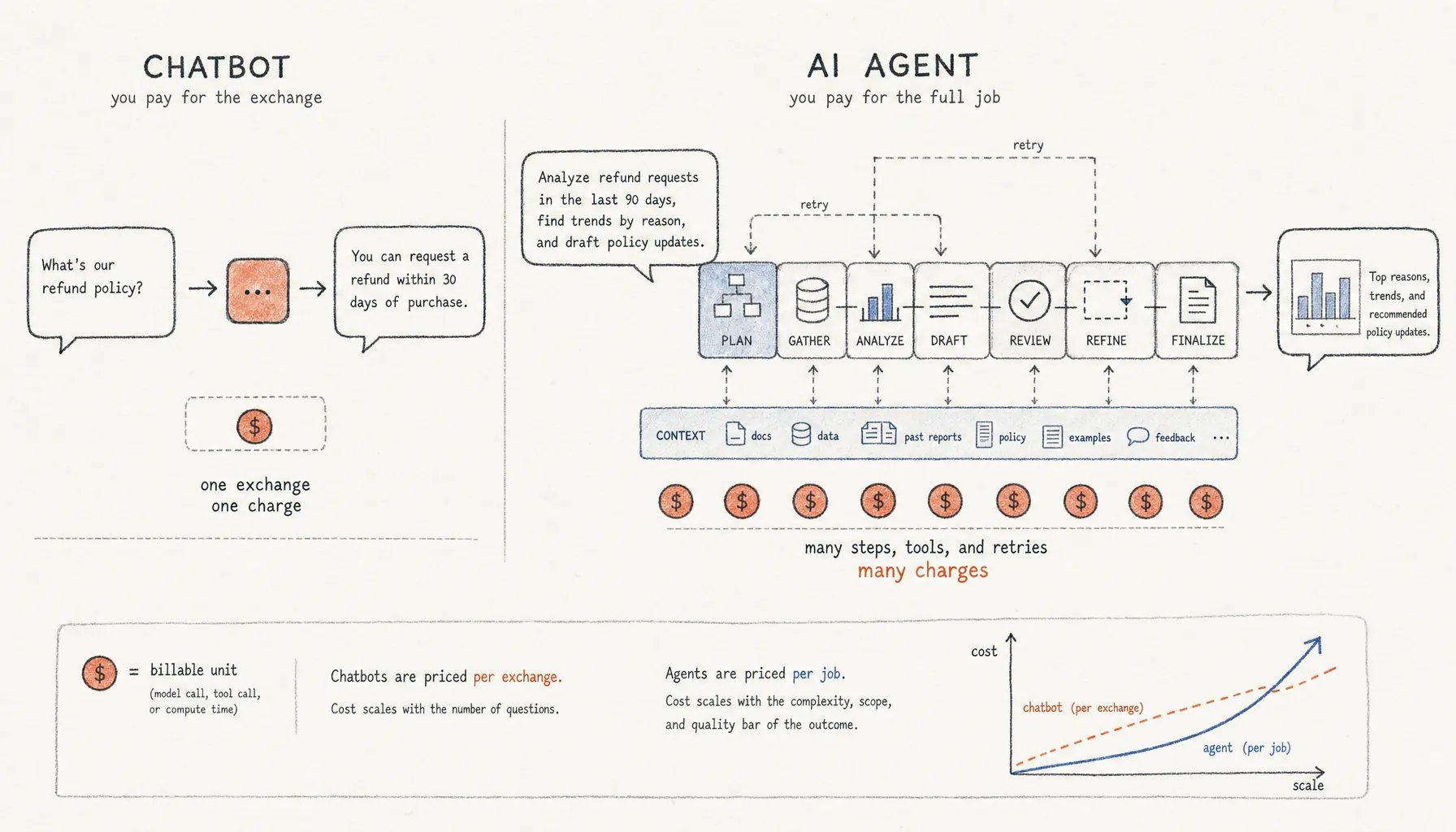
Chatbots usually charge per exchange. AI agents charge for the full job: planning, tool calls, retries, review, and context. That changes the cost model.
AI Agents vs Chatbots Cost: Why Agents Get Expensive at Scale
A chatbot can answer one customer question with a single model call. An AI agent might burn through 10 to 40 calls planning, searching, writing, checking, and retrying that same task. That’s the real difference behind AI agents vs chatbots cost: a chatbot bills for a conversation; an agent bills for a workflow. In 2026, that distinction matters because a lot of teams have moved from one-off prompts to semi-autonomous systems without updating how they budget for them.
Key Takeaways
- Chatbot costs usually scale with user turns. Agent costs scale with steps, tools, context length, retries, and review loops.
- Published model pricing is usually per 1 million input and output tokens, according to OpenAI API pricing, Anthropic model pricing, and Google Vertex AI generative AI pricing.
- An agent that looks cheap at $0.20 per completed task gets expensive fast when 80 employees run it 20 times a day, with retries and human review on top.
- The useful comparison is not “chatbot versus agent.” It’s cost per accepted output, after failed runs, tool calls, corrections, and supervision.
- Teams should cap agent loops, split cheap routing from expensive reasoning, and measure accepted work instead of raw AI usage.
AI Agents vs Chatbots Cost: The Short Answer
AI agents vs chatbots cost comes down to execution depth. Chatbots usually answer one prompt. Agents run multi-step workflows that can include planning, tool use, memory retrieval, code execution, evaluation, and retries. They cost more because every hidden step burns tokens, API calls, compute, and usually some review time from a human.
The cheap agent demo leaves out the expensive part. A chatbot interaction has a clean boundary: user asks, model answers. An agent workflow is messier. It might ask the model to make a plan, call a search tool, read five documents, draft a response, check that draft against instructions, revise it, then ask another model to score the result.
Sometimes that extra work is worth it. A support bot answering “Where is my order?” does not need agent behavior. A research agent comparing vendors across contracts, support tickets, and renewal history probably does. The mistake is pretending those two jobs have the same unit economics. They don’t.
For the broader company-level math, see Provn’s pillar analysis on AI cost vs employees. This page stays focused on the cost difference between chatbots and agents.
Cost Behavior: Chatbots Are Linear, Agents Multiply Work
Chatbot cost is mostly linear because each user turn usually creates one model request. Agent cost multiplies because one user request can trigger a chain of model calls, tool calls, context expansion, and retries.
The easiest way to see it is to count billable events. A chatbot support answer might include the user’s message, a short system instruction, a small retrieved knowledge snippet, and one model response. The same request handled by an agent may add classification, retrieval, planning, tool selection, API execution, validation, and fallback handling.
Model vendors make that structure pretty plain. According to OpenAI API pricing, token billing separates input and output usage, with extra distinctions such as cached input on supported models. According to Anthropic model pricing, input and output tokens are also priced separately, and prompt caching changes the math for repeated context. According to Google Vertex AI generative AI pricing, generative AI pricing often varies by input, output, modality, and caching behavior.
The practical formula is blunt:
Total workflow cost = runs × steps per run × tokens per step × model price + tool costs + compute + review time.
Most teams estimate the first and fourth terms. They price one run on one model. They skip the middle, which is where the money goes: how many steps the agent actually takes when the task is fuzzy, the data is dirty, the API fails, or the answer needs checking.
Why Agent Workflows Look Cheap Per Task but Expensive at Team Scale
Agent workflows look cheap when you test one task in isolation because the denominator is tiny. At team scale, cost rises through concurrency, repeated use, failed runs, and supervision.
Say an agent costs $0.18 in model usage to produce one competitive analysis draft. Sounds cheap enough. Now give it to 60 employees. Each runs it 12 times per week. The direct model bill lands around $6,739 per year before retries, premium models, storage, search, orchestration, logging, and human review. If 30% of runs need one retry and 20% need a senior employee to spend six minutes reviewing the output, the real cost moves fast.
And the issue is not just token spend. It’s workflow sprawl. Agents invite bigger asks because they look autonomous in a demo. A chatbot usually stays boxed in by design. An agent gets told to “handle the renewal packet,” “summarize the account,” “check the CRM,” and “draft the email.” Every extra verb adds another step. Every step adds another way for the workflow to go sideways.
That’s why the related question of Agentic AI Costs (2026): Token Usage and Workflow Controls needs its own budget model. The unit that matters is not a prompt. It’s an accepted business outcome.
Cost Comparison: Chatbot Interaction vs Agent Workflow
A chatbot is usually cheaper for narrow, repetitive questions. An agent is usually more expensive, but more capable when the task requires decisions across multiple systems. Pick the wrong one and you pay for it either way.
| Cost driver | Simple chatbot interaction | Autonomous or semi-autonomous agent workflow |
|---|---|---|
| Typical model calls | 1 call per user turn | 5 to 40 calls for planning, tool use, drafting, checking, and retries |
| Context size | Usually small: user query plus a few retrieved passages | Often large: instructions, memory, files, tool outputs, prior steps, and evaluation notes |
| Failure behavior | Bad answer is usually visible to the user | Bad intermediate step can poison later steps before anyone sees it |
| Human review | Often sampled or escalated | Often required for approvals, customer impact, compliance, or financial decisions |
| Best fit | FAQ, triage, status checks, knowledge lookup | Research, operations workflows, coding tasks, multi-system analysis |
The hidden edge case here is evaluation. Teams often bolt on a second model to check the first model’s work. Fair enough. Sometimes that improves quality. It also creates another billable path. The evaluator needs the original task, the draft answer, the rubric, and sometimes the source documents too. If the evaluator rejects the output, the workflow runs again.
Security and governance affect cost too. The OWASP Top 10 for Large Language Model Applications lists risks such as prompt injection, sensitive information disclosure, excessive agency, and insecure output handling. Those risks matter more for agents than for static chatbots because agents can call tools and take actions. Controls cost money. Skipping them usually costs more.
How to Compare Costs Before Rollout
The only comparison that holds up is cost per accepted output, not cost per prompt. A workflow that produces 1,000 cheap drafts and 300 usable outputs is not cheaper than one that produces 600 drafts and 540 usable outputs. This is where a lot of teams fool themselves with dashboard math.
- Define one accepted output in business terms, such as a resolved support ticket, approved sales brief, merged pull request, or completed vendor analysis.
- Map every model call, tool call, retrieval step, retry, and human approval needed to produce that output.
- Measure median and 95th percentile token usage separately so rare long runs do not disappear into averages.
- Separate cheap routing models from expensive reasoning models and record which steps actually need premium inference.
- Cap agent loops, tool calls, and context size before giving the workflow to a full team.
- Track accepted outputs, rejected outputs, correction time, and downstream errors for at least two full work cycles.
- Compare the measured cost against the human workflow it replaces or supports, including review time and rework.
The 95th percentile matters because agents do not fail evenly. One ambiguous task can trigger repeated search, longer context, and multiple revisions. If the system has no loop cap, the expensive cases end up defining the bill.
This is also where token budgeting belongs. Provn’s related page on AI Token Cost Estimate: Team Budget Formula for 2026 covers the team budget math in more detail, while Why AI Agents Use So Many Tokens: Workflow Causes in 2026 explains why token usage keeps climbing once agents start doing real work.
The Hiring Signal: Builders Who Measure Output Beat Tool Users
The best AI builders do not brag about using agents. They show where the agent should stop. That judgment is now a hiring signal.
Recruiters are drowning in AI-shaped claims. “Built an agent” proves almost nothing. The stronger portfolio shows the task boundary, the cost model, the failure cases, and the human review design. It says: this part should be a chatbot, this part should be an agent, this part should stay human, and here is the measured output rate.
That’s the difference between AI usage and AI work. Provn’s coverage of AI Productivity vs Usage: Output Metrics and ROI Signals gets into that distinction. For candidates, the bar is getting higher: show the logs, the acceptance criteria, the cost controls, and the judgment calls. The same point shows up in AI Skills in Hiring (2026): Portfolio Proof and Interview Signals.
Provn’s view is simple. Performance over pedigree. Proof over polish. In agent work, proof means showing that the system can produce accepted outputs at a cost the team can actually defend.
Frequently Asked Questions
Are AI agents more expensive than chatbots?
Usually, yes. AI agents cost more than chatbots when they do multi-step work. A chatbot often uses one model response per user turn. An agent may use planning calls, retrieval, tools, validators, retries, and human review. The size of the gap depends on task complexity, model choice, context size, and failure rate.
Why can an AI agent look cheap in a demo but cost more in production?
An AI agent demo usually shows one successful path. Production includes ambiguous requests, long context, tool failures, retries, logging, monitoring, review, and edge cases. Those costs only show up after repeated use across a team. The right metric is cost per accepted output, not cost per demo run.
When should a team use a chatbot instead of an agent?
Use a chatbot when the task is narrow, repetitive, low-risk, and answer-oriented, such as FAQ lookup, ticket triage, order status, or internal policy search. Use an agent when the task requires planning, multiple systems, source comparison, or staged execution.
How do token prices affect AI agents vs chatbots cost?
Token prices hit agents harder because agents usually consume more input and output tokens across multiple steps. Published pricing from OpenAI, Anthropic, and Google commonly separates input and output tokens, so long context and repeated generated drafts can change the bill in a real way.
What is the simplest way to control AI agent cost?
The simplest control is to cap loops and tool calls before deployment. Teams should also route easy steps to cheaper models, cache repeated context where supported, measure 95th percentile token usage, and require human approval for high-risk actions. Cost controls need to be designed before the workflow reaches the full team.